How different is the implementation of S/4HANA Cloud Public from on-premise?
post
by Alexander Roan on 5 Sep 2025
How different is a Public Cloud Implementation from On-Premise?
An S/4HANA Public Cloud implementation has a lot of similarities with any other SAP implementation, but there are some key differences.
My baseline understanding of Public Cloud was:
- Designed for customers who can operate 'mostly' standard processes
- Provided on a software/platform as a service basis
- Fastest way to access SAP innovations with frequent mandatory updates.
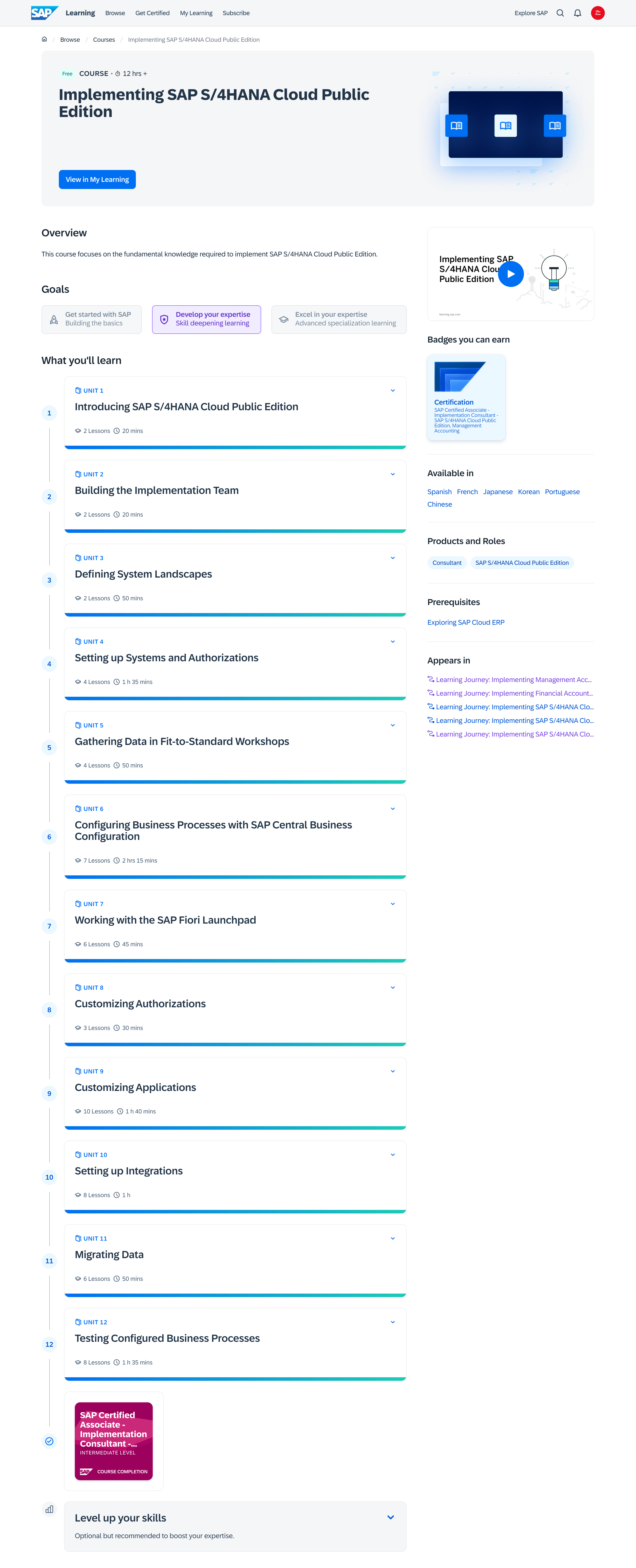
I worked through SAP's 12-hour 'Implementing SAP S/4HANA Cloud Public Edition' course to find out what was different.
The course provides a good overview of the key phases and activities. I was impressed by how much effort SAP put into collating and linking additional reference materials. You can deep dive into most topics.
Here are the course topics:
 .
.
As I worked through this course, I took detailed notes and prepared an Excel reference guide for implementation. I've added this to my website.
With this post, I'd like to share my top ten observations on implementing S/4HANA Cloud Public.
1: It's still S/4HANA
Paraphrasing a line from the training, "The customising screens are more or less the same as S/4HANA".
Of course, the ability to customise and develop Public Cloud is reduced, but where you can customise you are accessing the same configuration as S/4HANA.
For those not experienced with customising SAP, one thing to be aware of is the customising is an evolution from R/3 to ECC to S/4HANA, it isn't a completely new system.
Take for example finance. A lot of the S/4HANA customising for finance is done using the same customising transactions you used in R/3. However, there are changes and additions based on the simplifications items and new features that came with ECC (especially NewGL) and S/4HANA.
The tip I would share here is that it is not difficult for an R/3 or ECC consultant to get up to speed with the functional configuration for Public Cloud.
2: It's ALL Fiori
No more GUI, no more customising via the IMG (SPRO). Everything is done via Fiori. This is a huge shift.
For people that worked with R/3 and ECC for years, this is a huge change. Projects need to put a strong focus on change management here.
A big part of implementing and using Public Cloud is knowing which apps to use and how to use them.
A key part of Fiori is a shift to a much tighter 'role-based' design.
SAP explain this quite well with the example of the old GUI transaction 'MIGO'. This transaction is quite complex with many many fields. MIGO can be used to execute all kinds of goods movements. With Fiori SAP have moved towards individual apps for specific types of goods movements.
With Public Cloud you have can't rely on giving broad access to a range of transactions, you need to think about the specific set of apps each user needs.
There are a bunch of benefits here, I'd call out:
- Work is more guided, end users have specific sets of apps for specific tasks
- There should be more clarity on exactly what each role does.
3: Implementation is more guided
In R/3 and ECC the customising approach was more or less working through SPRO (the implementation guide transaction), with spreadsheets and checklists to help. Each customising transaction in SPRO had its own help file in the system, but sometimes these were difficult to understand.
This is now significantly different. The Cloud implementation process is built around several systems:
- S/4HANA Cloud Public itself
- SAP Cloud Application Lifecycle Management (ALM)
- SAP Cloud Central Business Configuration (CBC)
SAP recommend to use ALM to track scope, requirements, design etc.
Central business configuration is used to configure scope and some key 'global' settings, which are then deployed into S/4HANA. For specific line of business configuration, CBC acts as a kind of central hub with links to the Fiori Apps in S/4HANA to do specific settings.
4: The big challenges are still the big challenges
Those big topics that we always see on 'lessons learned' will likely continue to appear there:
- Requirements were missed from scope and/or 'fit-to-standard'
- Data cleansing wasn't started early enough
- Human resource quality/quantity issues:
- Lack of expertise in SAP
- Lack of expertise in 'as is' process, data, systems, etc.
- Poor alignment of expected work with implementation partners
- Poor design decisions through lack of governance
- Benefits not realised due to poor estimation and tracking.
These will still be big challenges for Cloud Public. However, the focus on staying very close to standard should provide some mitigations.
5: There's stil a lot to cover
One of the biggest challenges with SAP programs is the sheer amount of work.
Just reading through the implementation course, I'm reminded of how many things need to be co-ordinated:
- Process design
- Data cleansing, structure design, mapping, migration
- Integration design
- Roles
- Fiori UX related items (spaces, pages, training, etc.)
- Embedded analytics
- Additional analytics e.g. SAC, BDC
- Various test phases
- Custom design - various approaches (in-app, side-by-side)
When you consider many of these have to be addressed across multiple functional areas, the mind boggles at the workload.
6. Cloud mindset and the new 'run' model
There's a lot to consider here. Cloud-based software isn't new, but Cloud-based on the scale of ERP is quite huge.
There are obvious factors such as the loss of the GUI and the move to Fiori apps. However, there is a lot more to think about. Some examples:
- Limitations to how you can load migration data.
- You aren't loading into your own hosted system, you are loading into SAPs Cloud ecosystem
- Limitations to integration solutions.
- Again, you are integrating into SAPs Cloud ecosystem.
When it comes to your 'run' model, any change to SAP likely means a service request to SAP. This may be 'slower' than the way you manage your on-premise ERP today where you have infrastructure, functional consultants, and developers on-site who can make changes immediately.
7. Business roles and authorisation
In R/3 and ECC implementations, work on security profiles was often not well addressed:
- Security profile design and localisation left until the last minute
- A lack of thought on segregation of duties and delegation of authority
- A lack of testing on security profiles.
With Public Cloud, this part has become even more critical, and I'd suggest a little more complex.
The benefit of having more advanced role-based UI and security means that roles have to be carefully designed. Make sure to plan for:
- Analysing and understanding current roles
- Understanding how roles and catalogs drive access to apps and data
- Building custom 'localised' roles - minimum access principle
- The link between roles and Fiori space(s) and page(s).
7. Licensing and costs may need to be carefuly managed
I understand that one of the ways licence costs are calculated are based on user roles.
This is another reason why the design of business roles and hence the data and apps users have access to should be carefully defined.
In addition to this, there are a variety of additional solutions that are not included in the Public Cloud licence. Several are mentioned during the implementation training.
Care would need to be taken to correctly estimate costs and to potentially avoid adding a lot of 'nice to haves' during the implementation project.
9. The importance of implementation governance may still be underemphasised
In my experience, a lot of issues during implementation trace back to a lack of governance. I'd call out two examples:
- Design governance
During a 'fit-to-standard' a business expert has to agree to the suitability of standard processes, and they have to commit to the list of gaps. It's unusual how little governance is normally in place around this, considering we are looking at multi-million $ investments.
I'd suggest two interventions:
- There should be independent quality reviews on requirements and design.
- There should be a board level sign of confirming that the business experts provided the right inputs and sign off.
- A lack of professionalism on build and test
I think every SAP project I've been involved in, the users have faced basic issues during user acceptance tests. These have been a result of a lack of formality around configuration, build and environment preparation.
Technical teams need to carefully track their work, and this should have formal sign-offs and reviews.
10. Managing custom items in production
There are various options to develop in S/4HANA Public Cloud. In fact, there are four main approaches
- In-App key user
- In-App developer (cloud ABAP)
- Side-by-side low/no code
- SAP Build
- Side-by-side programming
- Business Application Studio - Python, JS, Java, etc.
So, there is still a lot of flexibility.
However, something important to plan for is the need to test custom developments with every release upgrade.
SAP provide some test automation tools with scripts that can be adjusted, but there may still be an ongoing management effort associated with custom developments.
11Benefiting from innovations
One of the big benefits of Public Cloud is the speed of release of updates.
The old model of implementing an ERP, using it for 10+ years, then upgrading it is gone.
SAP are making significant investments and automations across the board. Consider:
- The huge number of simplification items with S/4HANA
- Ongoing delivery of new processes, reports, tools
- e.g. working capital insights dashboard that I recently wrote about
- New capabilities e.g. Joule, Business Data Cloud
- Ongoing acquisitions and integration.
Public Cloud puts a company in a good position to leverage these innovations, but I think as part of the run model an organisation needs to think about a structure of product/process owners who can look at innovations on a regular basis and do some work to analyse requirements/benefit and manage activation of new items.
Share, comment/discuss
Share to: LinkedIn, X